
Purpose of Metadata
Metadata is data about the data. It consists of standardized attributes provided alongside the data to help organize and describe it, ensuring the data can be understood, discovered, accessed, and reused efficiently.
Metadata serves many purposes:
-
Understandability: Adds context, such as study name, assay type, or species, making data comprehensible even to those not involved in its generation.
-
Discovery: Standardized metadata makes data searchable and accessible through organized systems.
-
Interoperability: Ensures data can integrate with other applications smoothly.
-
Reusability: Enables effective data reuse by improving understanding, discovery, and compatibility.
Metadata Structure in the AD Knowledge Portal
All data and metadata that gets uploaded into Synapse is curated by the AD-DCC to ensure the metadata properly allows for data usability. In most cases, we require three things for every set of data:
-
The data itself, of course
-
Unstructured Metadata: This includes a description of the study and methods used to generate the data, as well as an acknowledgement statement.
-
Structured Metadata: While a subset of metadata is stored as annotations on the data files themselves, the complete metadata are stored within a separate set of files (in the form of .CSV, or comma-separated values—in a program such as Microsoft Excel). These metadata include extra details and about individuals, specimens (or biosamples) from the individuals, and the assay performed on the specimens.
Metadata in the AD Knowledge Portal is curated into three main files:
-
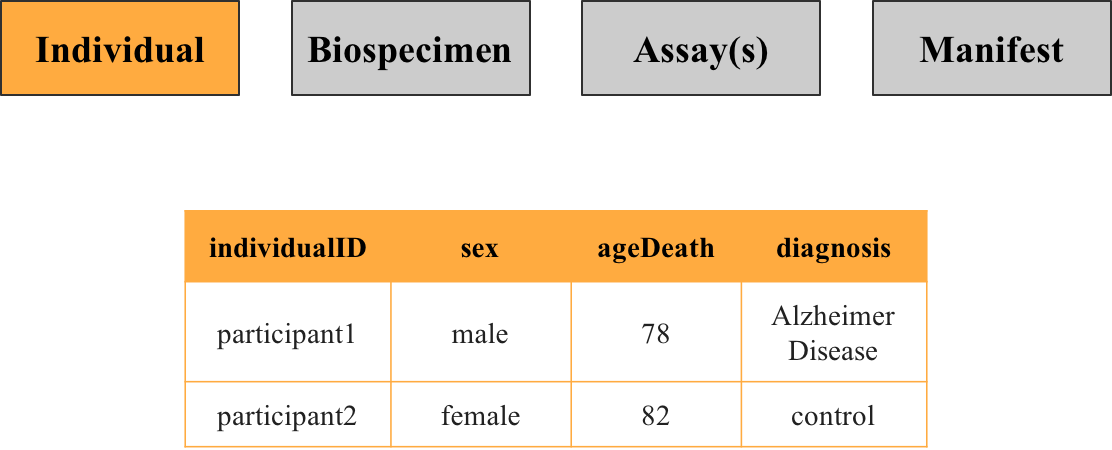
Individual Metadata: Contains participant details (e.g., sex, diagnosis) linked by individualID.
-
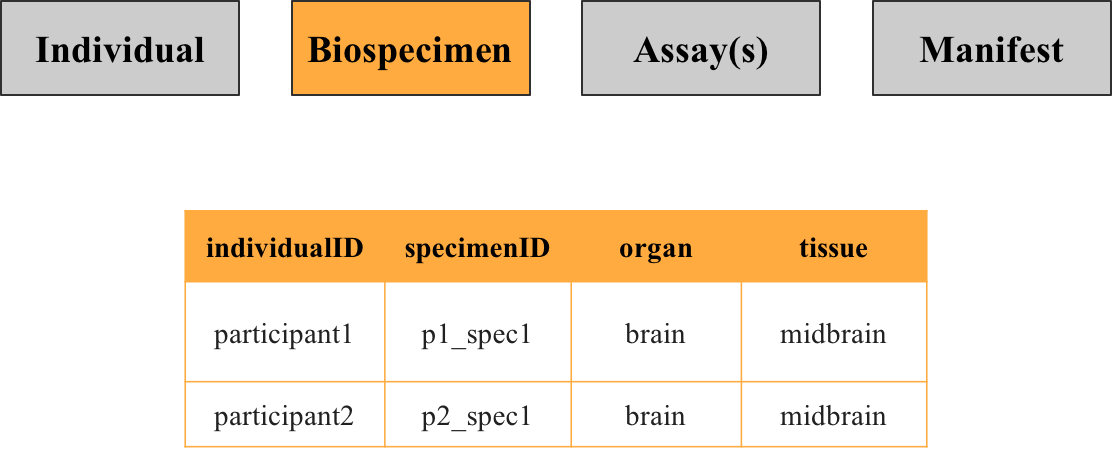
Biospecimen Metadata: Details specimens collected (e.g., organ, tissue type) linked by specimenID.
-
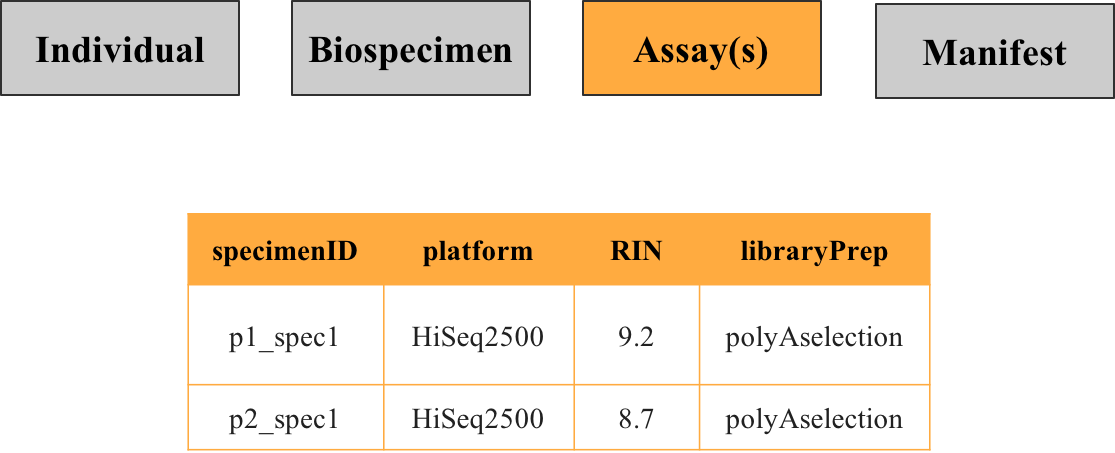
Assay Metadata: Describes methods used on specimens (e.g., platform, quality control).
The manifest file includes metadata about the files themselves. The data uploader uses this file to provide a set of metadata variables for the purpose of file annotations. These annotations are what allow you to perform queries while exploring data, in order to find and download the specific data you need.
Metadata File Contents
Individual Metadata
Contains details about study participants, such as sex and diagnosis. Each row represents a unique participant identified by the key individualID.
Biospecimen Metadata
Describes specimens collected from participants, including the source organ or tissue. Each row represents a unique specimen identified by the key specimenID, with individuals potentially linked to multiple specimens.
Assay(s) Metadata
Provides details about procedures performed on specimens to generate data, such as the technology used, batch processing, or quality control metrics. For instance, RNA sequencing metadata would specify the platform used and specimen preparation details. Multiple assay metadata files may exist if specimens or individuals underwent different assay types.
How to Join Metadata Files
Metadata files for individuals, biospecimens, and assays can be linked using individualID and specimenID. These connections enable you, the user, to combine metadata with the data itself, creating a comprehensive view of each file.
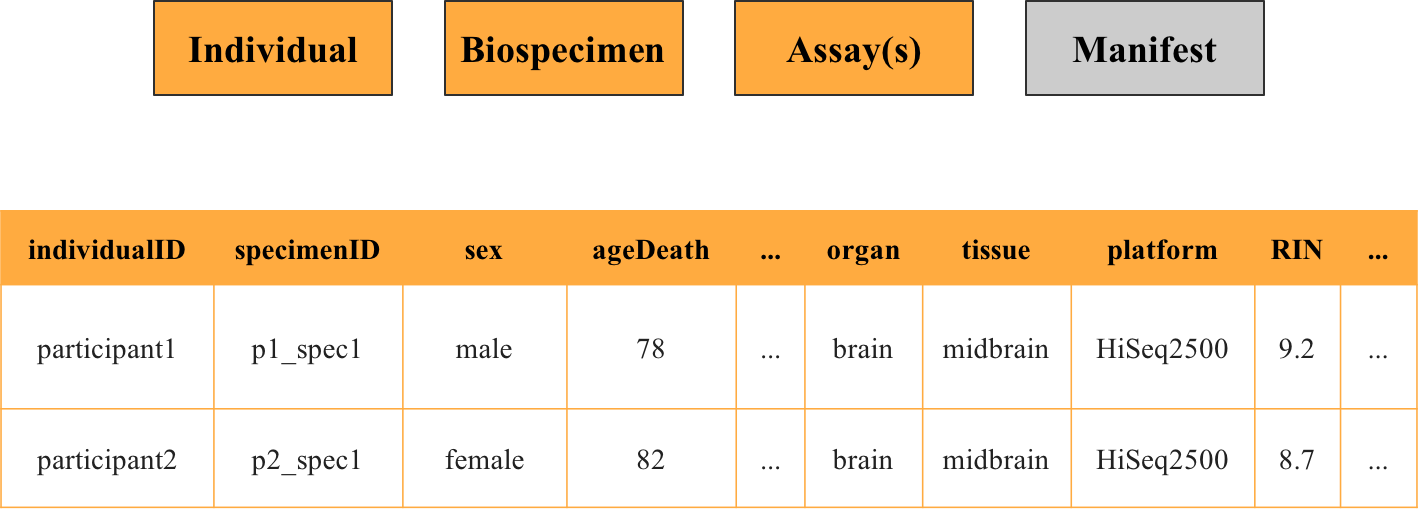
The general steps outlined above are provided at a high level; you can find more detailed, step-by-step instructions described in the following example scenario: Use Case #3: Accessing and Joining Metadata Files With Data.
Metadata Dictionary
The AD Knowledge Portal Metadata Dictionary is a resource that helps users and contributors understand and use metadata effectively. It provides standardized terms for querying or contributing data, ensuring consistency and clarity.
Metadata templates are subject to change as our data standards evolve, so we recommend downloading templates close to when you plan to submit them or verifying which templates to use with the data manager supporting your ticket.
Who Benefits from the Metadata Dictionary?
-
Users: Helps you understand metadata terms in annotations and files, making it easier to search for and retrieve data.
-
Contributors: Provides accepted values for metadata keys. For example, a HiSeq 2000 machine should be labeled as “HiSeq2000” (no space) under the key platform.
How to use the metadata dictionary
The dictionary includes helpful search tools:
-
A global search bar to look up any term.
-
Dedicated column search bars for narrowing results within specific columns.
Scroll to the bottom to navigate between pages if you don’t see all rows at once.
Important Definitions
-
Key: Name of the metadata term.
-
Key Description: Explanation of the term’s purpose.
-
Type: Expected data type (e.g., string, integer).
-
Value: Specific allowed values or a blank field if any text is accepted.
-
Value Description: Details about the value, if applicable.
-
Source: Origin of the value description (e.g., a link or document name).
-
Module: The group or context the term is associated with.